


If your week includes content creation, daily social media management, replying to comments, and sending reports, tool choice matters. Vista Social vs Sked Social comes down to whether you want a wider all-in-one bundle of social media scheduling tools, or a collaboration-first bundle that highlights unlimited users for smoother teamwork.
Both tools cover social publishing, inbox work, and reporting, but they take different paths once you scale. Vista Social leans into add-on modules like review management, employee advocacy, and DM automations, while Sked Social leans into approvals, a social inbox approach, and “no seat fees” that suit growing teams.
Vista Social vs Sked Social: Quick Comparison Overview
In Vista Social vs Sked Social, you’re comparing two platforms that aim to replace a stack of smaller apps across key social media platforms. Both pitch scheduling, engagement, and reporting as a single workspace, then add “more features” to stand out for teams managing multiple accounts and more than one workflow.
The “feel” is different once your team grows. Vista Social scales with user limits by plan, while Sked Social talks about unlimited users and charges mainly by social accounts, which can be easier for agencies handling multiple clients.
What is Vista Social?

Vista Social vs Sked Social starts with Vista Social as a broad social media management suite. It positions itself around publishing, a unified inbox and smart inbox experience, analytics, listening, review management, a link-in-bio and bio tool approach (with landing pages and link tracking style use cases), plus modules like employee advocacy and workflow-focused DM automations.
Pricing is shown with tier limits on profiles and users, plus a 14-day trial. If you want to compare other tools in the same category, see the Vista Social Alternatives page for a wider list of options and other platforms to consider alongside Vista Social vs Sked Social.
What is Sked Social?
In Vista Social vs Sked Social, Sked Social is usually described as collaboration-first scheduling that grew beyond Instagram. Its core set includes publishing, approval workflows, a unified inbox / social inbox style hub, analytics, social listening, and a link-in-bio and bio tool feature called Sked Link that many teams use like lightweight landing pages.
Sked Social messaging leans hard into unlimited users and workflow speed, which can suit teams with frequent reviewers. If you want other choices with similar positioning, see the Sked Social Alternatives page to compare plans, inbox depth, and approval workflows across other platforms.
Vista Social vs Sked Social Comparison Table
A quick table makes Vista Social vs Sked Social easier to scan before you get into details. Think of this as a first pass, then validate edge cases like inbox channel coverage, auto posting behavior, and how well each tool handles post previews during a trial.
The table leans on what each vendor states on official pages and what was captured in the research notes. Pricing and packaging can change, so treat current checkout screens as the final word, especially if you care about whether paid plans start low, whether a free tier exists, or whether free plans are offered at all.
| Area | Vista Social | Sked Social |
|---|---|---|
| Starting paid plan | $39/month (Standard) | $59/month (Launch) |
| Trial | 14 days, no card | 14 days |
| User model | Users limited by plan | Unlimited users |
| Account model | Profiles included per tier | Social accounts per plan + add-ons |
| Link-in-bio | Vista Page | Sked Link |
| Listening | Included on Professional+ | Promoted as included on new plans |
| Reviews | Review management module | Inbox includes some GBP review touchpoints |
| Approvals | Workflow listed, tier-gated | External no-login approval portal |
| Integrations | Zapier/Make shown at higher tier | Zapier plus asset tools like Drive/Dropbox |
Vista Social vs Sked Social Features Comparison
The feature conversation in Vista Social vs Sked Social is less about “can it schedule posts” and more about scope and how the core features are packaged. Vista Social bundles reviews, DM automations, and employee advocacy, while Sked Social bundles approvals, inbox, and reporting with unlimited users for smoother team coordination.
This matters because teams rarely buy a tool for one month. Over a year, pricing model, the number of social accounts, and the “extras” you’ll actually use can outweigh a long checklist, especially if your workflow relies on bulk scheduling, workflow automation, and repeatable publishing systems.
Core Features Overview
At the core of Vista Social vs Sked Social, both platforms cover the same daily loop: plan posts, post scheduling, publish, reply, and report. Both also push AI features for writing and reporting support, which can help speed up copy drafts, content suggestions, and commentary for stakeholder updates.
Where the difference shows up is gating and packaging. Vista Social adds listening and reviews at Professional, while Sked Social positions approvals and collaboration as standard across plans, which is often appealing for small teams that need structure without extra overhead.
Vista Social Key Features
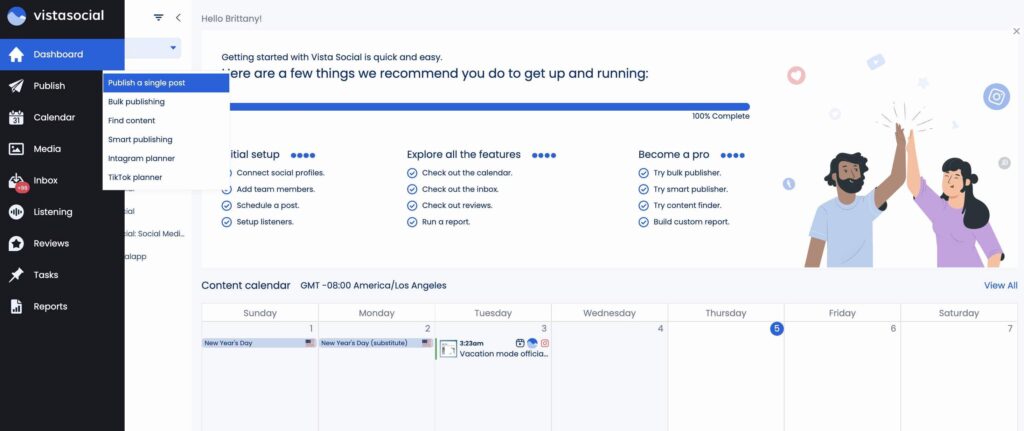
In Vista Social vs Sked Social, Vista Social’s core set includes publishing, inbox work, reports, and Vista Page inside its Standard tier. Higher tiers add bulk scheduling, post workflow, report scheduling, listening tools, and review management, which can reduce tool sprawl for small businesses and agencies.
Vista Social also markets DM automations as a named module, plus an AI Assistant. If your brand runs comment-to-DM flows, needs hashtag suggestions, or wants a tighter “calendar to inbox” loop with a visual content calendar, those features are worth testing in real campaigns.
Sked Social Key Features

For Vista Social vs Sked Social, Sked Social’s core set is shaped around publishing, approvals, inbox, analytics, and link-in-bio. It also promotes unlimited users, which changes cost math for agencies and multi-stakeholder teams that rely on reviewers, freelancers, and clients.
Sked Social also markets broader publishing formats, like Instagram Stories with stickers, LinkedIn Docs, and TikTok carousels. If your content calendar leans into TikTok scheduling, first comment workflows, or approval-heavy publishing, that promise can matter when you evaluate a starter plan versus premium plans.
Unique Features: Vista Social vs Sked Social
The standout part of Vista Social vs Sked Social depends on how you work. Vista Social leans into modules that go beyond social posting, such as review management and employee advocacy, which can fit brands that treat social as part of a wider customer experience.
Sked Social leans into frictionless approvals and unlimited users, then adds reporting and listening as part of the bundle. If your work involves shared calendars and frequent sign-offs, the external approval portal can reduce back-and-forth and keep team productivity high even in complex workflows.
Analytics and Reporting Capabilities
Reporting is where Vista Social vs Sked Social can split for agencies and stakeholders. Both vendors talk about exportable reports, but Sked Social puts extra emphasis on stakeholder-ready outputs like one-click PDFs and shareable dashboards that summarize performance metrics.
Vista Social includes reports even on Standard, then adds report scheduling and advanced analytics language on higher tiers. If you need weekly summaries that show engagement tracking and clearer ways to track performance, confirm exactly which reports and exports are available in the plan you expect to keep.
Vista Social Analytics Tools
In Vista Social vs Sked Social, Vista Social states that reports are included from its entry plan, with exports like CSV and PDF mentioned on official pages. Professional adds report scheduling, and Advanced calls out advanced reporting in plan copy, which can be useful if you distribute reports across multiple clients.
User sentiment snapshots referenced in the research notes mention a “visual overview” and multi-client calendar view as a plus. If your reporting process starts with “what ran this week,” that calendar view can matter almost as much as charts and tables.
Sked Social Analytics Tools
With Vista Social vs Sked Social, Sked Social markets page, post, follower, and “advanced” analytics, plus demographics and best-time recommendations. It also claims PDF reports, custom reports with AI commentary, and dashboard sharing via a view-only link, which supports fast client review cycles.
Sked Social also calls out Meta ads analytics as part of its reporting story. If paid reporting is part of your client pack, test the paid breakdown screens during your trial so the numbers match how your team reports outcomes.
User Interface and Ease of Use: Vista Social vs Sked Social
Day-to-day usability matters more than a long list of features in Vista Social vs Sked Social. The “best tool” is often the one your team sticks with under deadline pressure, not the one with the longest feature page.
Both tools talk about a single dashboard, but real-world usage is shaped by navigation, calendar clarity, inbox speed, and how fast you can move from planning to publishing. For teams that post frequently, even small friction points can add up across weeks.
Interface Design Comparison
For Vista Social vs Sked Social, Vista Social is often described as clean and easy to navigate, with a strong visual overview. Many teams prefer a visual content calendar that supports quick scanning, post grouping, and consistent posting across multiple social profiles.

Sked Social positions its interface around approvals and review links that keep work moving. If you run lots of stakeholder checks, the interface story leans more toward review flow than dashboard breadth, which can be a better fit for agencies juggling many reviewers.

Learning Curve and User Experience
In Vista Social vs Sked Social, Vista Social’s learning curve tends to follow its module count. A team that uses scheduling, inbox, listening, reviews, and advocacy will spend more time mapping workflows across modules, and some users describe that as a steep learning curve early on.
Sked Social’s learning curve tends to follow approvals and account grouping. If your team already uses a formal review step, Sked’s workflow framing can feel natural quickly, especially for teams that prefer clear status steps over custom setups.
Mobile App Functionality
Mobile reality can shift Vista Social vs Sked Social for creators and field teams. If you publish while traveling, you need fast checks for approvals, reliable notifications, and stable “ready to publish” views.
Mobile apps often lag behind desktop for deep reporting. If your workflow depends on mobile approvals or last-minute edits, test mobile publishing alerts and review flows during your trial window rather than assuming parity.
Team Collaboration Features
Collaboration is a top decision point in Vista Social vs Sked Social for agencies and larger organizations. It affects cost, review speed, and how safely you can involve clients, contractors, and internal stakeholders.
Vista Social ties collaboration more closely to tier limits and plan gates. Sked Social uses unlimited users as a headline promise, which can shift how you design collaboration tools and approval
Workflow Management and Approval Processes
In Vista Social vs Sked Social, Vista Social lists approval workflow as part of publishing, with “post workflow” explicitly tied to higher tiers. That suggests a shift from solo scheduling to structured reviews as you move up plans and your team becomes more process-driven.

Sked Social puts approvals at the center and promotes an external no-login approval portal. For teams with external stakeholders, this reduces friction and supports faster approvals even when reviewers are not daily users of the tool.

Role-Based Permissions and User Management
User management shapes the real cost of Vista Social vs Sked Social. Vista Social plan packaging includes user caps, which can work well for small business owners and lean marketing teams that want a defined set of roles.
Sked Social packaging states unlimited users at no extra cost, which changes how you invite clients and contractors. If you are a large enterprise or have strict governance needs, also ask about role depth, audit trails, and whether white label features exist for agency-facing reporting.
Team Communication Tools
In Vista Social vs Sked Social, Vista Social’s engagement module lists assignments, tagging, and internal notes for handoffs. These tools make it easier to assign messages and keep follow-ups organized when you handle a busy inbox across channels.
Sked Social mentions internal notes and workflow statuses in the context of approvals. If your team already runs on status labels like “needs edits,” those built-in statuses can reduce side chats and keep shared calendars aligned.
Vista Social vs Sked Social for Content Management
Content management is where Vista Social vs Sked Social moves from “posting” to “running a system.” This includes how you schedule, how you store assets, and how you keep posts consistent when teams expand.
Both tools support bulk scheduling and calendars, but asset handling and cross-platform format support shape real outcomes. The right choice depends on whether you publish many formats or manage many brands at the same time.
Content Scheduling and Publishing
In Vista Social vs Sked Social, Vista Social tiers show bulk scheduling starting at higher plans, with added workflow and integration options. If you schedule in batches for many profiles, that tier gate matters when you plan cost and output volume.
Sked Social markets bulk scheduling plus advanced format coverage like LinkedIn Docs and TikTok carousels. If format variety is central to your plan and you care about post previews, auto schedule behavior, and reliable publishing, validate each format during trials.
Content Library and Asset Management
Asset flow can decide Vista Social vs Sked Social in day-to-day work. Vista Social mentions browser extensions for content collection and web-to-post workflows, which can suit teams that curate from many sources.sertion into posts.

Sked Social promotes integrations with asset tools like Dropbox, Google Drive, and Canva. If your team already lives inside those tools, that can reduce file hunting during scheduling.

Multi-Platform Support
Vista Social vs Sked Social supports a wide set of platforms, but the exact list matters. Brands often manage Instagram, Facebook, LinkedIn, X, TikTok, and more.
If you manage multiple accounts for clients, you also want steady publishing reliability. Test each platform connection and check if any channel has limits.
Some buyers also look for unlimited posts and easy scaling. If you want unlimited profiles, ask about enterprise custom pricing and plan rules.
Social Media Management Capabilities
Vista Social vs Sked Social is more than scheduling. It includes inbox work, listening, and keeping up with brand conversations.
This is where a tool becomes true social media management, not just a scheduler. A strong inbox plus listening support helps teams react faster.
Social Listening and Monitoring Tools
Listening is marketed in Vista Social vs Sked Social as part of higher-value plans, not just a bonus widget. Vista Social has a dedicated listening module and frames listening tools as a step-up feature that supports keyword tracking and broader monitoring.
Sked Social also positions listening as included for new plans, with sentiment tracking and competitor benchmarking language in its reporting story. If you want competitive tracking and report-ready outputs, confirm the benchmark limits and filters during a trial.
Vista Social Listening Features

In Vista Social vs Sked Social, Vista Social listening is framed as tracking conversations beyond owned profiles through keywords and phrases. That suits teams who monitor brand mentions, campaign reactions, and topic shifts across the social media ecosystem.
Vista Social also pairs listening-adjacent work with review management, which helps local brands that want reputation signals tied into their broader publishing plan. If reviews and listening both matter, the bundle can reduce tool switching.
Sked Social Listening Features

For Vista Social vs Sked Social, Sked Social listening is often described as sentiment-focused with AI summaries. It also references presentation-ready listening reports, which can fit client-facing reporting cycles for agencies.
Sked positions listening as simple and presentation-friendly, but real value depends on how well it handles noise. Teams should test query quality, filters, and saved searches during trial, especially when monitoring broad topics.
Engagement and Response Management
Engagement work is the daily grind in Vista Social vs Sked Social. Vista Social lists a smart inbox with conversation view, tasks, tags, internal notes, and actions for efficient triage, which helps when you manage many inbound threads.
Sked Social lists a centralized inbox with assignments, templates, and AI-assisted replies, plus UGC handling. If your team relies on a unified view of conversations, confirm which channels support full thread actions inside the unified inbox versus partial actions.
Social Media Management Tools Compared
Putting it together, Vista Social vs Sked Social is a choice between breadth and collaboration-first packaging. Vista Social adds modules that widen the suite, while Sked Social emphasizes approvals, unlimited users, and reporting that’s easy to share.
If evergreen publishing is your main need, it can be worth comparing both against a recycler-first tool like RecurPost. RecurPost is commonly evaluated for recurring posts and smart queues, which can reduce repeated manual scheduling when you want consistent publishing with minimal effort.
Marketing and Automation Features
Marketing automation is a practical split point in Vista Social vs Sked Social. Some teams want comment-to-DM flows and automation within engagement, while others want approvals rules and publishing safeguards.
Both tools talk about AI, yet automation can mean different things across products. It can mean auto posting, workflow rules, saved reply templates, or queue logic that keeps content moving without constant manual work.
Campaign Management Tools
For Vista Social vs Sked Social, Vista Social supports campaign-style planning through its calendar and workflow layers. If you manage coordinated launches across several social media platforms, a clear calendar plus strong approvals reduces errors.
Sked Social frames campaign coordination through approvals, review links, and team workflows. If your campaign bottleneck is stakeholder sign-off, a clean approval loop can matter more than extra configuration options.
Marketing Analytics
In Vista Social vs Sked Social, Sked Social markets custom reporting with AI commentary and shareable dashboards, which helps agencies produce updates quickly. This can support stakeholder-ready storytelling around performance metrics and engagement tracking.

Vista Social includes reports from the entry tier, then expands reporting and scheduling at higher plans. Agencies that send weekly packs should confirm how exports and scheduling work, especially if you need standardized templates across multiple clients.

Automation Capabilities
Automation means different things in Vista Social vs Sked Social. Vista Social markets DM automations for replying to DMs and comments, which can support lead magnet flows and FAQ-style replies.
Sked Social automation leans more toward workflow rules like “publish only if approved,” plus templates and AI reply assistance. If you care about auto schedule behavior and queue logic, test those details rather than assuming both tools behave the same.
Integrations and Platform Compatibility
Integrations shape what “fits” in Vista Social vs Sked Social when you connect assets, tickets, and reporting exports. Even strong schedulers feel clunky if they can’t connect to your storage tools or the systems your team already uses.
Both tools mention Zapier, and both list a range of supported networks. If you need deep API access, treat it as a sales question and confirm before purchase, especially if your team already runs automation across other platforms.
Native Integrations Comparison
In Vista Social vs Sked Social, Vista Social mentions Zapier and Make at higher tiers, plus support-ticket style workflows in engagement notes. That points to a path for routing social messages into support processes.
Sked Social lists a wider integration set on its pricing materials, including creative and asset tools like Drive and Dropbox. If your asset workflow already depends on shared cloud storage, these integrations reduce copy-paste and upload friction.
Vista Social Integrations

For Vista Social vs Sked Social, Vista Social’s pricing notes tie Zapier and Make access to higher tiers. That implies lighter integrations at entry levels and deeper automation bridges in higher plans.
If your team is building workflow automation across systems, confirm which triggers and actions are supported. This matters when you want notifications, content ingestion, or report distribution to be consistent.
Sked Social Integrations

With Vista Social vs Sked Social, Sked Social promotes native connections with core social networks plus tools like Canva, Dropbox, Frontify, and Google Drive. That set fits teams that treat assets as a shared library across campaigns.
Sked’s integration approach can be helpful when you produce high volumes of creative. Still, confirm which integrations are native versus routed through Zapier so expectations match setup time.
Third-Party Apps and API Access
API questions come up fast in Vista Social vs Sked Social for larger teams. If you need deep custom workflows or proprietary dashboards, ask early about API availability and any limitations.
If you depend on third-party apps for analytics exports, client approval portals, or white-labeling, confirm whether those tools connect cleanly. This is especially relevant for agencies considering white label features as part of client service packaging.
Vista Social vs Sked Social Pricing and Plans
Pricing changes the whole conversation in Vista Social vs Sked Social once you add more profiles and reviewers. A tool can look cheap on day one, then jump once you add users, social accounts, or feature tiers.
Vista Social is priced by plan with profile and user limits per tier. Sked Social is priced by plan plus social accounts, with unlimited users included, which can feel simpler for agencies and distributed teams.
Vista Social Pricing Tiers
In Vista Social vs Sked Social, Vista Social’s pricing is commonly listed as Standard at $39/month, Professional at $79/month, and Advanced at $149/month. Some pricing pages also show a higher tier like Scale at $379/month, with Enterprise typically positioned as contact sales/custom , so it’s smart to double-check the exact tier names and limits when you’re ready to upgrade.
Sked Social Pricing Tiers
For Vista Social vs Sked Social, Sked Social is typically shown as Launch at $59/month, Grow at $149/month, and Accelerate starting from $399/month, and it’s often presented as annual plans billed yearly even when monthly equivalents are displayed. Launch usually includes 3 social accounts with additional accounts priced at about +$8/month each, Grow includes 6 social accounts with extras around +$10/month each, and Accelerate pricing varies by volume—so your final cost mainly depends on how many social accounts you manage.
Free Trial and Free Plans
Trial access is similar in Vista Social vs Sked Social, at least in the captured notes. Both tools promote a free trial window, which is the safest way to confirm publishing behavior and workflow fit.
Some buyers also ask about a free tier or free plans for light usage. If a free tier exists, it often has tight limits, so treat it as a test environment rather than a long-term solution unless your posting needs stay small.
Value for Money: Which Offers Better ROI?
ROI in Vista Social vs Sked Social depends on what drives your cost. Vista Social cost grows with more users and tier gates, while Sked Social cost grows with more social accounts and add-on account pricing.
It also depends on whether you need bundled extras inside the same tool. If your main need is evergreen scheduling with recurring posts and smart queues, RecurPost can be a strong value option, while Vista Social and Sked Social may be better when you want a wider operational suite.
Customer Support and Resources
Support can decide Vista Social vs Sked Social after the first two weeks. A tool can look great in a demo, then fall apart if onboarding is slow or answers take days.
Both vendors reference help centers and support channels, but the texture differs. If your team runs complex workflows or manages many accounts, fast answers and clear documentation reduce downtime.
Support Options and Response Times
In Vista Social vs Sked Social, Vista Social has public support paths and app listing support contact details. Some review excerpts in the research notes mention responsive customer support, which is helpful during setup.

Sked Social also promotes broad support availability across channels. If response time is a deal-breaker, send a real trial ticket early, include screenshots, and track how fast you get a usable answer.

Training, Onboarding, and Documentation
Training affects speed to value in Vista Social vs Sked Social. Vista Social lists a help center and learning resources that can support onboarding when teams adopt new workflows.
Sked Social also links a help center and publishes workflow documentation, including approvals guidance. If your collaboration model relies on shared calendars and approvals, clear documentation reduces confusion.
Community and User Resources
Community signals can add context in Vista Social vs Sked Social, even if they’re not perfect truth sources. Vista Social includes public content like product updates and educational resources that help teams learn features faster.
Sked Social also points to resource hubs that can help with setup. If you’re evaluating alongside other platforms like Sprout Social, compare the depth of onboarding content and how often it is updated.
Vista Social vs Sked Social: Which Should You Choose?
Choosing between Vista Social and Sked Social is less about declaring a winner and more about match. One team needs review management and DM automations, another team needs client approvals without login friction and predictable pricing for unlimited users.
If you’re torn, pick two workflows and test them end-to-end in both trials. Scheduling a post is easy; handling edits, approvals, inbox routing, and reports is where real friction shows up.
When to Choose Vista Social
In Vista Social vs Sked Social, Vista Social fits teams that want broad scope inside one vendor. Review management plus a link-in-bio and bio tool workflow, plus employee advocacy and listening, can reduce the number of subscriptions needed for day-to-day social operations.
Vista Social also fits teams that accept user limits by plan and want a tier ladder. If you’re starting small and scaling, those tiers can map to growth stages, especially when you begin managing multiple accounts and multiple clients.
When to Choose Sked Social
For Vista Social vs Sked Social, Sked Social fits teams that need unlimited collaborators and smooth approvals. The external no-login approval portal and workflow framing can reduce review delays, which supports team productivity when many people need to sign off.
Sked Social also fits format-heavy publishers that need Stories stickers, LinkedIn Docs, and TikTok carousels. If TikTok scheduling and frequent approvals are central to your work, Sked’s collaboration approach can feel like the better fit.
Key Decision Factors for Your Business
In Vista Social vs Sked Social, cost drivers matter as much as features. Vista Social pushes you to plan around user caps and tier gates, while Sked Social pushes you to plan around social account counts and add-on fees.
Workflow shape is the other big factor. If your bottleneck is comment handling, listening, and reviews, Vista Social’s modules can help. If your bottleneck is stakeholder sign-off and shared review loops, Sked’s approval workflows can matter more.
Better Alternatives to Consider [RecurPost of course]
If you’re reading Vista Social vs Sked Social, you may also want a third angle: evergreen-first publishing. RecurPost is often shortlisted when recurring posts and smart queues are the core need, because it’s designed to keep content cycling with minimal effort rather than building a broad suite of add-ons.
RecurPost can also be appealing when you want predictable scheduling systems for small businesses, small teams, and agencies that manage repeating content themes. If you’re comparing Vista Social vs Sked Social alongside other platforms like Sprout Social, RecurPost is a useful benchmark for “evergreen-first” workflow design.
Vista Social vs Sked Social FAQs
FAQs around Vista Social vs Sked Social usually come down to cost, trial risk, and switching pain. These answers assume you’ll validate edge cases like inbox channel coverage, approvals, and reporting during a real trial.
Both tools claim broad capability, yet each team’s must-have list is different. Use these FAQs as a checklist for trial planning, especially if you are comparing several other platforms at the same time.
Is Vista Social or Sked Social better for small businesses?
In Vista Social vs Sked Social, small businesses that want reviews plus scheduling may lean toward Vista Social, especially if they value a broader suite. It can also fit small business owners who want a single dashboard to handle scheduling, inbox work, and reporting in one place.
Small businesses with many collaborators may lean toward Sked Social because unlimited users remove per-seat stress. If you work with contractors, partners, or clients who need approvals, Sked’s collaboration model can feel simpler.
Which social media management tool is more affordable?
Affordability in Vista Social vs Sked Social depends on how many accounts and users you need. Vista Social may look lower at the point where paid plans start, while Sked Social often becomes more predictable when user count grows because it includes unlimited users.
Also consider whether billed yearly pricing changes the total cost. For agencies, the best model is the one that scales cleanly when you add social accounts and bring more reviewers into the workflow.
Can I switch from Vista Social to Sked Social?
Switching in Vista Social vs Sked Social is mainly about content history, asset libraries, and team habits. Plan time to rebuild workflows like approvals rules, saved replies, and reporting templates, especially if you use custom reports.
If you rely on automations like DM flows, review management, or structured tagging, map those workflows before moving. Run both trials in parallel for a short time so you can compare outcomes and reduce risk.
Which has better customer support?
In Vista Social vs Sked Social, both tools point to strong support, but the best test is practical. During a trial, send a real question about your workflow, such as approvals, inbox coverage, or reporting exports, and track response speed and clarity.
Support quality also shows up in documentation depth. If you are building complex workflows for larger organizations, clear setup instructions can be as valuable as fast tickets.
Do Vista Social and Sked Social offer free trials?
Yes, Vista Social vs Sked Social is generally trial-friendly. Use the free trial window to test one full workflow, not just scheduling a post, and confirm publishing behavior like auto schedule settings and post previews.
If you are also hunting for a free tier or free plans, confirm current availability directly on the vendor pricing pages. Free offerings change more often than paid tiers, so treat them as a bonus rather than a guarantee.

Debbie Moran is a Digital marketing strategist with 5+ years of experience producing advertising for brands and helping leaders showcase their brand to the correct audience. She has been a part of RecurPost since 2019 and handles all the activities required to grow our brand’s online presence.



