


ContentStudio vs Hootsuite: Quick Comparison Overview
ContentStudio and Hootsuite both sit in the “all-in-one social media dashboard” camp, but they suit different teams.
ContentStudio suits agencies, brands, and growing businesses that want one hub for publishing, content discovery, AI captions, teamwork, and reporting. It supports big channels like Facebook, Instagram, X (Twitter), LinkedIn, Pinterest, TikTok, YouTube, Google Business Profile, Tumblr, and more.
Hootsuite is built for larger teams that need strong social media scheduling, a shared inbox, social listening, AI content tools, and many integrations. It feels built for brands with strict rules, many team members, and heavy social media analytics needs.
Starting Price:
- ContentStudio’s paid plans start at $29 per month for small teams with 1 user, 1 workspace, and 5 social accounts, plus a 14-day free trial.
- Hootsuite’s Standard plan is priced at $149 per user each month for up to 10 social profiles, with a 30-day trial and no free forever plan.
Target Users:
- ContentStudio suits agencies, social media managers, and brands that handle many clients or products. Its shared calendars, workspaces, and branded white-label reports keep each client space neat and separate.
- Hootsuite suits bigger in-house teams and enterprises that care a lot about social listening, security rules, formal approvals, and connecting many tools through a large app directory.
Platforms Supported:
- ContentStudio connects to the big social networks from one dashboard: Facebook, Instagram, X (Twitter), LinkedIn, Pinterest, TikTok, YouTube, Google Business Profile, Tumblr, and more, all manageable from web and mobile apps.
- Hootsuite supports a broad set of channels, too, including Facebook, Instagram, X (Twitter), LinkedIn, TikTok, YouTube, Pinterest, and others, plus 100+ extra integrations through its app directory.
Collaboration:
- ContentStudio brings workspaces, team roles, client approval links (without login), and internal notes. Higher plans add white-label access so agencies can match each brand style for clients.
- Hootsuite includes multi-user permissions, approval workflows, assignment of messages, and training resources (courses, academy, certifications) for teams that manage many brands across departments.
Content Recycling & Automation:
- ContentStudio includes evergreen posting queues and ready automation recipes. Brands can recycle top posts across networks and keep content calendar slots filled on repeat, boosted by AI social media captions.
- Hootsuite leans on bulk upload, smart posting time tips, and AI-generated content with tools like OwlyWriter. It handles advanced scheduling well, but evergreen looping is not the center of its pitch.
Analytics:
- ContentStudio packs cross-platform social media analytics with branded and white-label reports. Users can schedule report emails and view data by labels across Facebook, Instagram, LinkedIn, Pinterest, YouTube, TikTok, and more.
- Hootsuite brings richer analytics for bigger teams: network-level dashboards, competitor tracking, paid + organic reporting, “best time to post” studies, and social listening insights that tie sentiment and trends back into reports.
ContentStudio vs Hootsuite is a trade-off between a modern, agency-friendly hub at a mid-range price and an enterprise-leaning giant. ContentStudio leans toward publishing, AI features, evergreen queues, and branded workspaces. Hootsuite suits bigger teams that place more weight on social listening, detailed analytics, and a wide integration stack, even with higher per-seat costs.
What is ContentStudio?

ContentStudio is an all-in-one social media management platform and content marketing tool for agencies, brands, and marketers. It brings content discovery, AI writing, post creation, social media scheduling, analytics, and a shared social inbox into one workspace.
Teams use a multi-view content calendar to plan posts, drag them between days, and schedule to many networks at once. AI captions, content ideas, and discovery feeds keep queues filled with fresh posts. Client links and workspaces give each brand its own calendar, assets, and access rules.
Branded and white-label reports carry agency logos and land in inboxes on a set schedule. On web, iOS, and Android, users review posts, approve content, reply to messages, and track stats while on the move.
Not sure ContentStudio is right for you? Discover powerful ContentStudio alternatives worth trying.
What is Hootsuite?

Hootsuite is a long-running social media management platform used by brands of many sizes. It suits mid-market and enterprise teams that run busy social channels. It combines social media scheduling, content creation, a unified inbox, social listening, and detailed analytics inside one dashboard.
Inside Hootsuite, teams bulk-schedule posts across major platforms with a drag-and-drop calendar. They manage campaigns across Facebook, Instagram, X (Twitter), LinkedIn, TikTok, YouTube, Pinterest, and more in one place.
OwlyGPT and OwlyWriter power AI social media captions, hashtags, content ideas, and short briefs. A shared inbox gathers comments and messages from several networks and assigns them to teammates. Social listening dashboards track brand mentions, trends, and competitor moves.
Custom views compare channels, track results, and link social performance with wider goals. Hootsuite also has a large app directory with 100+ integrations. On top of that, Hootsuite Academy and certifications target professional social media management teams that want structured learning.
In the wider ContentStudio vs Hootsuite story, Hootsuite fits better for larger groups that need social listening, governance, and advanced reporting at scale.
Looking for a Hootsuite alternative? Compare the top tools and find the best fit for your workflow.
ContentStudio vs Hootsuite Comparison Table
Comparing ContentStudio vs Hootsuite side-by-side to see how they stack up across the things that matter most: pricing, platform support, content recycling, and more:
| Feature | ContentStudio | Hootsuite |
| Starting Price | Around $29/month for the Standard plan; 14-day free trial | Around $149 per user each month for the Standard plan; 30-day free trial |
| Supported Platforms | Facebook, Instagram, X (Twitter), LinkedIn, Pinterest, TikTok, YouTube, Google Business Profile, Tumblr, and more | Facebook, Instagram, X (Twitter), LinkedIn, TikTok, YouTube, Pinterest, plus many more through 100-plus integrations |
| Best For | Agencies, social media managers, and brands that want shared workspaces, AI tools, and branded reports at mid-range pricing | Larger in-house teams and enterprises that need social listening, strong analytics, and a big integration stack |
| Visual Planning | Multi-view content calendar with drag-and-drop scheduling and shareable client calendars | Drag-and-drop planner with streams and columns for monitoring plus calendar views for planning campaigns |
| Collaboration | Workspaces for brands and clients, task assignment, internal notes, client approvals via shared links, and white-label options on higher plans | Multi-user permissions, message assignment, approval flows, and training via Hootsuite Academy and learning resources |
| Content Recycling & Automation | Evergreen queues and automation recipes for recurring posts across channels, plus AI captions | Strong scheduling, bulk upload, AI writing, and “best time to post” data; evergreen loops sit in the background |
| Analytics | Cross-platform media analytics with branded or white-label reports and scheduled sends | Advanced dashboards, benchmarking, and analytics linked with listening data and both paid ads and regular posts |
| Mobile App | Full-featured mobile app on iOS and Android for composing posts, switching workspaces, approvals, and basic analytics | iOS and Android app for scheduling, monitoring streams, replying to messages, and handling notifications |
ContentStudio vs Hootsuite Features Comparison
Core Features Overview
Both ContentStudio and Hootsuite handle day-to-day social posting, but they shine in different places.
ContentStudio centers on planning and publishing for brands and agencies. It combines a drag-and-drop planner, a multi-channel composer, AI captions, evergreen queues, a social inbox, and white-label reporting inside workspaces for each client or brand.
Hootsuite is built for larger teams that need strong publishing, monitoring, and analytics. Inside one dashboard, you get scheduling across major networks, an AI writer (OwlyWriter), a unified inbox, social listening, and detailed analytics, plus a big integration library.
ContentStudio Key Features
- Multi-Channel Planner & Composer: Plan posts on a content calendar and publish them to many networks. The planner supports drag-and-drop changes, filters, and views by channel, status, or user.
- AI Content & Discovery: ContentStudio comes with AI writing for captions. Discovery feeds pull trending posts from RSS and saved topics.
- Workspaces, Approvals, & Teamwork: Brands and agencies can group accounts, calendars, and reports into workspaces. Each workspace supports content review, client links (no login), and internal notes on posts.
- Social Inbox: A shared inbox pulls messages and comments from linked accounts. Teams can reply, tag, and clear conversations from one place.
- White-Label Reports: Agencies attach their own logo, export reports, and schedule sends so clients can see their branded social media analytics.
Hootsuite Key Features
- Publishing & Calendar: Hootsuite gives a planner to create, schedule, and queue posts. Templates and collaboration tools sit right inside the composer for faster campaign planning.
- OwlyWriter AI & Creative Tools: OwlyWriter AI writes captions, post ideas, and campaign copy from short prompts, while integrations like Canva and Adobe Express plug into the composer for quick visuals.
- Unified Inbox & Customer Care: A central inbox pulls in comments and messages from different social networks. Teams answer from a single place, and higher tiers add chatbot support.
- Social Listening & Monitoring: Listening streams for brand, competitor mentions, keywords, and hashtags make it easier to track conversations and spot trends alongside scheduled posts.
- Integrations & App Directory: Hootsuite connects with 100+ apps across CRM tools, cloud storage, ad platforms, and more, so teams can plug social data into the rest of their stack.
Unique Features: ContentStudio vs Hootsuite
ContentStudio stands out for agencies and brands that live inside client workspaces and rely on white-label reports. Workspaces, approval flows, content discovery, and branded analytics suit teams that manage many accounts under one roof.
Hootsuite is most useful when you need larger groups that care about AI social media tools, social listening, and integrations. OwlyWriter AI, the unified inbox with chatbot add-ons, and the big app directory fit busy marketing and support teams.
Bottom line: ContentStudio vs Hootsuite shows an agency-first tool versus an enterprise-first tool best when listening + reporting drive your workflow.
Analytics and Reporting Capabilities
Both tools include strong analytics, yet they move in slightly different directions. ContentStudio works better for branded client reports, while Hootsuite if perfect for social media analytics and sentiment views for bigger teams.
ContentStudio Analytics Tools

- Channel stats for Facebook, Instagram, LinkedIn, Pinterest, and other linked profiles on one screen.
- Charts for reach, engagement, and post performance grouped by channel, campaign, or content type.
- White-label report builder with branding, PDF export, and scheduled email sends for clients.
Hootsuite Analytics Tools

- Post performance reports across Facebook, Instagram, Threads, X (Twitter), LinkedIn, Pinterest, YouTube, and TikTok inside one dashboard.
- Sentiment charts and industry benchmarks compare accounts with peers in the same space.
- Flexible report templates and custom reports, plus scheduling and export options for regular stakeholder updates.
User Interface and Ease of Use: ContentStudio vs Hootsuite
Interface Design Comparison
ContentStudio centers the dashboard around a big content calendar. Simple menus for Planner, Composer, Inbox, Analytics, and Workspaces keep things clear for busy teams. Color-coded posts and filters make it quick to see what each brand has lined up.

Hootsuite uses a wider control panel. Its dashboard shows streams, columns, analytics, inbox, calendar, and the app directory in one place. This suits teams that like many panels on screen, but can feel heavy for new users.

In short, ContentStudio works best for a tidy, calendar-first feel, while Hootsuite feels more like an all-in-one control room.
Learning Curve and User Experience
ContentStudio is easier to get productive in quickly, especially for smaller teams using Planner + Inbox daily. Reviews mention time savings, an easy layout, and smooth daily posting for agencies and small teams.
Hootsuite earns praise for giving social teams one hub to connect accounts and schedule content. The social media management platform keeps calendars and streams together, which suits power users.
Because Hootsuite includes streams, social listening, inbox, ads, and more, new users may need extra time to feel fully comfortable.
Overall, ContentStudio tends to feel simpler for smaller teams, while Hootsuite suits power users who want more controls.
Mobile App Functionality
Both tools ship full mobile app versions on iOS and Android.
The ContentStudio app acts like a pocket dashboard. Users create and schedule posts, review and approve content, and switch between multiple profiles from the phone. Its calendar view and approval flow stand out for agencies that work on the go.
The Hootsuite app lets users schedule posts, watch streams, track mentions, and reply to comments and messages in one place. Many teams treat it as a quick companion to the desktop dashboard.
So, in mobile use, ContentStudio works best for content calendar and approval tasks, while Hootsuite mirrors its stream-based view for live monitoring and social media management.
Team Collaboration Features
Workflow Management and Approval Processes
ContentStudio is built with agency approvals in mind. Inside each workspace, posts move through a clear path: creators draft, reviewers edit, and approvers give final sign-off. An Approver role, client “magic links,” and on-calendar comments keep feedback tied to the content calendar instead of email threads.
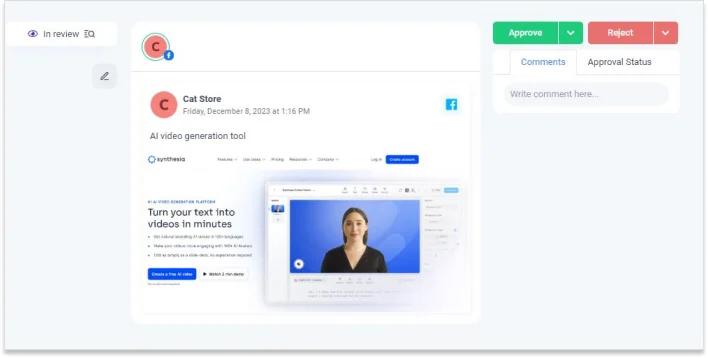
Hootsuite also supports structured approvals, mainly on higher plans. Teams can set flows where editors, legal, or brand leads must review posts before they go live. Advanced and Enterprise tiers define who creates content, who reviews, and who grants final approval, while smaller plans still cover post and comment assignment.

Both platforms cover end-to-end approvals. In ContentStudio vs Hootsuite comparisons, ContentStudio leans toward agency–client sign-off, while Hootsuite suits larger in-house teams with longer chains.
Role-Based Permissions and User Management
ContentStudio uses role-based access inside each workspace. Owners, Administrators, Collaborators, and Approvers receive different controls for accounts, posting, and settings. This structure protects client data while still keeping shared work smooth across many brands.
Hootsuite uses a similar idea at the organization and team level. Social profiles sit inside teams, and admins decide which profiles each team manages. Roles define who drafts, schedules, approves, or only views content, with more custom options on higher tiers.
So, ContentStudio keeps permissions tightly tied to workspaces for each client or brand, while Hootsuite spreads them across organizations and teams, which suits global or multi-department setups.
Team Communication Tools
ContentStudio does not act as a full chat app, yet it keeps teamwork close to posts. Teams and clients comment on calendar items, react to drafts, and trigger email alerts through the approval system. Shared workspaces, tuned permissions, and real-time comments keep feedback near content instead of scattered across tools.
Hootsuite follows a similar path and adds links to outside chat hubs. Teammates leave internal comments on posts, assign messages from the unified inbox, and keep notes beside content. A Microsoft Teams integration can route social messages into channels, where they can be discussed and reassigned.
Neither platform replaces Slack or Teams; both keep feedback attached to posts and conversations. In ContentStudio vs Hootsuite, ContentStudio leans on workspace comments and email notifications, while Hootsuite adds internal notes plus strong links into external chat apps.
ContentStudio vs Hootsuite for Content Management
Content Scheduling and Publishing
Both ContentStudio and Hootsuite line up posts in advance, so teams can skip daily manual publishing.
ContentStudio runs scheduling through a flexible content planner and publisher. Teams can schedule posts from a drag-and-drop content calendar across Facebook, Instagram, X (Twitter), LinkedIn, Pinterest, YouTube, TikTok, Google Business Profile, and more.
Also, they can use bulk upload via CSV to queue hundreds of posts in one batch and re-run strong content through evergreen queues and RSS automation, so winning posts keep returning.

Hootsuite leans on large-scale content scheduling across major networks, so teams can create and schedule posts from a central calendar for all main social channels. They can use Bulk Composer to upload a CSV and schedule many posts at once, and also pick “recommended times” based on audience or industry data, so posts land when followers stay most active.
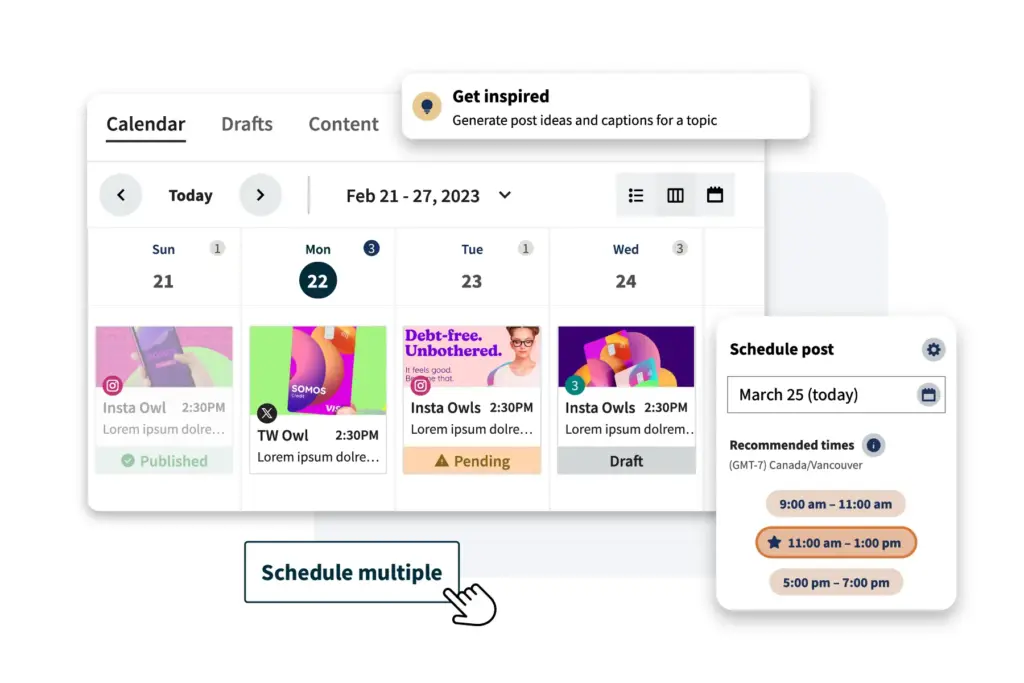
For scheduling, ContentStudio vs Hootsuite feels like bulk queues plus evergreen posting and RSS flows versus bulk uploads plus smart timing.
Content Library and Asset Management
A shared asset library matters most when multiple people publish across multiple brands.
ContentStudio includes a built-in media library that works like a shared drive. It lets teams store and organize images and videos in folders and subfolders, then search and filter quickly, and use a Global Media Folder to share assets across all workspaces without repeated uploads. It also helps pull media from connected sources and reuse files across many campaigns.
Hootsuite also includes a shared media library, with a slightly different angle. It lets teams keep brand assets in one space and reuse them across posts, and also grab free stock photos and GIFs from built-in stock and GIPHY when fast visuals are needed.
So ContentStudio leans toward structured asset storage across client workspaces, while Hootsuite leans toward quick creative sourcing from shared and stock libraries.
Multi-Platform Support
Both tools cover the big social networks, with small shifts in channel range.
ContentStudio supports wide multi-platform publishing from one dashboard. Channels include Facebook, Instagram, X (Twitter), LinkedIn, Pinterest, YouTube, TikTok, Google Business Profile, plus options like WordPress and Threads in certain flows.
Hootsuite also centralizes major networks and adds more messaging-style channels. Its docs list Facebook, Instagram, X (Twitter), LinkedIn, TikTok, YouTube, Threads, WhatsApp, and Pinterest as supported networks.
Both platforms handle the classic brand set: Facebook, Instagram, X (Twitter), LinkedIn, YouTube, TikTok.
So, comparing ContentStudio vs Hootsuite, ContentStudio leans stronger into Google Business Profile and blog-friendly tools like WordPress, while Hootsuite stretches further into Threads and WhatsApp, which suits brands that rely on messaging-heavy channels.
Social Media Management Capabilities
Social Listening and Monitoring Tools
ContentStudio works best for watching conversations on owned pages, not the whole web. Its Social Inbox pulls comments and messages from Facebook, Instagram, YouTube, LinkedIn, Pinterest, and TikTok into one feed. For wider social listening, ContentStudio mentions “advanced social listening” on higher tiers, yet it still feels closer to light monitoring.

Hootsuite goes deeper into social listening and social monitoring. Every plan includes Streams and a quick search for mentions, keywords, and hashtags. On Enterprise plans, Listening powered by Talkwalker tracks topics, sentiment, and trends across many networks and sites.
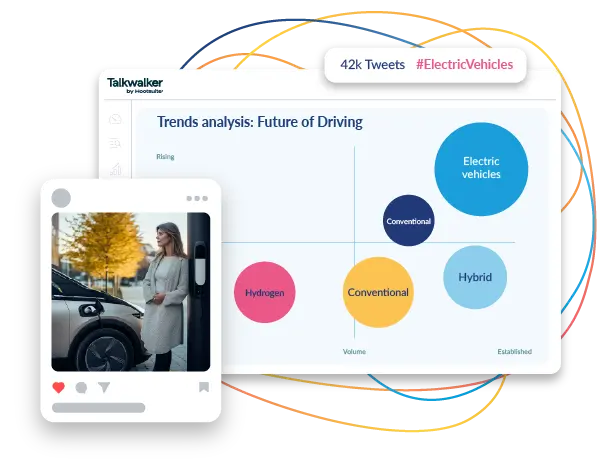
So, for broad keyword, sentiment, and competitor tracking across many networks and websites, Hootsuite steps ahead in ContentStudio vs Hootsuite comparisons, while ContentStudio excels in monitoring owned channels and mentions that reach the inbox.
ContentStudio Listening Features
- Watch comments, replies, and direct messages from connected Facebook, Instagram, YouTube, LinkedIn, Pinterest, and TikTok accounts in one Social Inbox.
- Uses filters, tags, and assignments so teams can slice conversations by channel, status, or assignee and keep response work tidy.
- Puts more weight on social monitoring for brand reputation through these owned channels rather than wide, external listening feeds.
Hootsuite Listening Features
- Core dashboard supports Streams for mentions, keywords, and hashtags across major social networks, right beside your publishing calendar.
- Enterprise customers can add Listening (powered by Talkwalker), which tracks brand mentions, topics, and trends across 30+ social networks and many web sources with long historical coverage.
Engagement and Response Management
Both platforms give you a central place to answer people, but with different reach.
With ContentStudio, the Social Inbox shows comments and messages from linked profiles in one timeline. Teams reply, tag, assign chats, and use saved replies without opening each native app. Assignment, filters, and collision detection keep agents from replying to the same message at once.
With Hootsuite, the inbox covers messaging across Facebook, Instagram, X (Twitter), WhatsApp, TikTok, LinkedIn, and Threads. YouTube comments sit in Streams with moderation tools. A combined view shows public and private messages, with teammate assignment and Instagram DM automation for repeat questions.
Social Media Management Tools Compared
In daily social media management, ContentStudio works well as a multi-brand inbox for agencies and small teams. It gives a clear, lean space to watch and reply on owned pages and profiles.
Hootsuite pairs wide social listening with an inbox that spans more networks and links with AI tools, Talkwalker data, and integrations.
Neither platform acts as a full CRM. Hootsuite leans closer to an insight-and-engagement hub, while ContentStudio gives leaner teams a tidy reply center for connected accounts.
Marketing and Automation Features
Campaign Management Tools
ContentStudio treats campaigns like steady content streams. Posts sit in content categories and smart queues that stay active over time. Evergreen campaigns, RSS-to-social flows, and repeating schedules keep blog posts, promos, and curated links moving across channels.
It does not act like a full ad platform or funnel builder. Instead, ContentStudio shines as a campaign hub for organic social and content distribution.
Hootsuite goes a bit further for classic campaigns. Teams see organic posts and paid social in one place. From this advertising view, they track spend, results, and status for boosted posts on networks like Facebook and Instagram.
So, for full email or funnel journeys, brands still need extra tools. While in ContentStudio vs Hootsuite, Hootsuite holds a wider grip on paid plus organic social campaigns.
Marketing Analytics
Both tools track social performance, yet with a slightly different angle.
In ContentStudio, the analytics page pulls reach, engagement, clicks, and follower trends into one view. Competitor analytics and page benchmarks sit beside these charts. Teams turn these views into branded or white-label PDF reports that are sent on a schedule. This suits agencies that need clean, client-ready decks without rebuilding charts in another tool.
Hootsuite Analytics adds more dials. Dashboards show post and account results across many networks, plus industry benchmarks. The platform also shows the best time to post windows based on past data and goals, right inside the calendar.
Comparing ContentStudio vs Hootsuite, neither of them replaces a full revenue tracking tool, but both still give enough numbers to keep content plans on track and share progress with stakeholders.
Automation Capabilities
Automation is one of ContentStudio’s strongest cards. The platform includes multiple automation recipes, such as evergreen automation that recycles top posts at chosen intervals with varied captions, RSS-to-social and content curation that push articles from feeds into queues with AI or metadata-based captions, and recurring slots and smart queues that keep feeds active once the rules are set.

Once a recipe is in place, campaigns can run on “autopilot” for weeks or months, with reporting showing how recycled and automated posts perform.
Hootsuite leans on automation in a different way. Its auto-scheduling and best-time suggestions help posts land when the audience stays most active. Its AI content tools draft captions, adjust tone, and fill gaps in calendars, and its social ad workflows make boosting posts and reading ad results easier inside the same dashboard.
There is less weight on category-level evergreen loops than in ContentStudio. Instead, Hootsuite centers on timing tweaks, AI support at scale, and smoother paid campaign handling.
So, for deep evergreen queues and RSS-driven posting, ContentStudio stands out, and for brands that care more about ad campaigns, timing, and wide marketing automation, Hootsuite feels closer to a bigger, more complex dashboard.
Integrations and Platform Compatibility
Native Integrations Comparison
ContentStudio Integrations
ContentStudio connects straight to everyday channels. Workspaces link to Facebook, Instagram, X (Twitter), LinkedIn, Pinterest, YouTube, TikTok, and Google Business Profile: posts and analytics move in and out from one screen.
Inside the composer and media library, ContentStudio pulls visuals from Flickr, Pixabay, Imgur, and Giphy. Teams grab images and GIFs without leaving the dashboard.
An Integrations hub pushes Zapier as the main bridge. Through Zapier, ContentStudio hooks into thousands of apps for flows like RSS to social posts or CRM events to campaigns.
Hootsuite Integrations
Hootsuite takes a wide app-directory path. It links natively to Facebook, Instagram, X (Twitter), LinkedIn, TikTok, YouTube, Pinterest, Google Business Profile, and WhatsApp.
On top, it adds a full App Directory. This gallery lists 100-plus partner tools inside the Hootsuite dashboard. From that space, teams connect CRM and sales tools such as HubSpot and Salesforce. Work tools like Wrike and Asana sync tasks.
Creative apps such as Canva, Adobe, Cloudinary, Issuu, Vidyard, and Dropbox keep design files close. Influencer and e-commerce tools like Upfluence and Shopify apps support campaigns.
So, in this ContentStudio vs Hootsuite integrations match, ContentStudio keeps integrations neat with direct channel links and Zapier bridges, while Hootsuite leans on a large, curated app gallery built into the dashboard.
Third-Party Apps and API Access
ContentStudio exposes its own API. Guides show links with Pabbly Connect and n8n for no-code and low-code automation. Teams can fetch workspace data, read connected accounts, create posts, and schedule them programmatically.
For most groups, Zapier feels simpler. The ContentStudio–Zapier link supports actions such as “Create Social Post” and “Delete Social Post.” These actions chain with WordPress, HubSpot, Canva, and other apps, so new content or leads trigger new social posts.
ContentStudio leans on three layers. One layer covers native social and media connections. Another layer uses its own API for advanced flows, and the last layer runs through Zapier, Pabbly, and n8n for broad automation.
Hootsuite also publishes a public API and a full Developer Portal. Vendors use these to build apps for the Hootsuite directory. Teams gain extra features without leaving the main social media management hub.
Hootsuite connects to Zapier as well, which lets teams link Hootsuite with thousands of extra apps for tasks like sending new RSS items, form fills, or CRM events straight into the Hootsuite scheduler.
In practice, ContentStudio gives a strong mix of native social links and API-based automation. Hootsuite adds that as well, plus a rich marketplace, which suits stacks where social sits close to CRM, project tools, and creative platforms.
ContentStudio vs Hootsuite Pricing and Plans
Pricing shapes which social media management tools teams pick for daily work. Here is how ContentStudio vs Hootsuite stack up on cost and limits:
ContentStudio Pricing Tiers
ContentStudio runs three main plans that suit solo marketers, small teams, and agencies:
- Standard: $29/month (1 user, 1 workspace, 5 social accounts)
- Geared towards solo marketers and users
- Includes the planner, AI assistant, basic reporting, and media library
- Advanced: $69/month (2 users, 2 workspaces, 10 social accounts)
- Perfect for small businesses and teams
- Adds stronger analytics and more collaboration options
- Agency Unlimited: $139/month (unlimited users and workspaces, 25 social accounts)
- Built for agencies with many clients
- Client management features, competitor analytics, and live training
Pricing is flat per plan rather than per user, which keeps costs predictable as teams grow.
Hootsuite Pricing Tiers
Hootsuite uses a per-user pricing model with a higher starting cost but heavier enterprise capabilities:
- Standard: $149 per user/month (1 user, 10 social accounts)
- Aimed at solo marketers, freelancers, and creators
- unlimited scheduling, recommended posting times, a shared inbox, and built-in AI captions
- Advanced: $399 per user/month (1 user, unlimited social accounts)
- Best for brands and agencies that run many social profiles
- Deeper analytics, longer listening windows, bulk scheduling, and richer approval workflows
- Enterprise: Custom pricing (5 users, unlimited social accounts)
- Built for large organizations, franchises, and big agencies
- An advanced inbox, optional advanced analytics, and enterprise-grade support and training
Overall, Hootsuite climbs in price faster because the cost scales by user seat, not just by the number of profiles.
Free Trial and Free Plans
- ContentStudio
- Free trials: 14-day free trial on paid plans
- Free plan: No long-term free plan is listed on the current pricing page
- Hootsuite
- Free trials: 30-day free trial on Standard and Advanced plans
- Free plan: No longer keeps a forever-free plan
Value for Money: Which Offers Better ROI?
In the ContentStudio vs Hootsuite comparison, review platforms draw a clear gap between the two on value for money.
ContentStudio holds ratings near 4.7 / 5 on sites like Capterra, with strong ROI notes from users. Many mark it as “best bang for your buck” because mid-range pricing still covers a wide feature set.
Hootsuite scores closer to 4.1 / 5 on Capterra value for money ratings. Some reviewers say rivals bring similar or richer features at a lower monthly bill.
So, for smaller teams that want more profiles and users on a tighter budget, ContentStudio usually gives stronger ROI, while Hootsuite suits brands ready to pay more for heavier listening, advanced analytics, and an enterprise-grade social media management platform.
Customer Support and Resources
Support Options and Response Times
ContentStudio gives several support paths: email or help desk, live chat, and a detailed FAQ and knowledge base. Listings on sites like Capterra mention a 24/7 live representative for many users. Customer service scores sit around 4.6/5, with most reviews praising quick, friendly replies and a few noting slower responses during busy hours.
Hootsuite also runs a wide support setup. Users can turn to the help center and FAQ, in-app chat, email tickets, and on higher tiers, phone support and success managers. Ratings sit closer to 4.2/5 for customer service, with strong feedback for the knowledge base but mixed comments around billing requests and wait times.
In ContentStudio vs Hootsuite comparisons, ContentStudio tends to feel more budget-friendly with warmer scores, while Hootsuite links support more tightly to higher plans.
Training, Onboarding, and Documentation
ContentStudio leans on self-serve learning. The help docs walk through features step by step, and ContentStudio Academy videos break tools into short lessons. Webinars, live online sessions, and guides on topics like batching content or building posting schedules give small teams ready-made playbooks.
Hootsuite brings one of the strongest education ecosystems among social media management tools. It’s Help Center groups content under clear themes such as “Get started”, “Create & plan posts”, “Inbox”, “Analytics”, and “Listening”.
Also, Hootsuite Academy adds structured courses and certifications on social media marketing, plus regular webinars and “Social Trends” reports for more advanced teams.
For training, ContentStudio often suits lean agencies that want a quick setup and simple videos, while Hootsuite suits teams that treat education as an ongoing program with badges and formal learning paths.
Community and User Resources
ContentStudio builds community mainly around its content hub. The blog, glossary, case studies, and resource pages share real workflows from agencies and growing brands. The academy and help center also act as on-demand training for new hires joining teams that already use ContentStudio.
Hootsuite stretches wider into the community. Alongside a large blog and resource library, it hosts live and on-demand webinars and runs the “Status Update” community space for social marketers. Years of market presence mean many third-party tutorials, YouTube channels, and peer groups now exist around Hootsuite.
In ContentStudio vs Hootsuite, ContentStudio feels like a tight set of guides and videos for smaller teams, while Hootsuite brings a big user base community with more peer tips, templates, and outside resources.
ContentStudio vs Hootsuite: Which Should You Choose?
When to Choose ContentStudio
While considering ContentStudio vs Hootsuite, choose ContentStudio if:
- Your work revolves around client brands and workspaces
- You care a lot about evergreen posting and automation
- You need strong value for money (Review sites’ ratings of around 4.8/5)
- Your team is small or mid-sized, and you want a clean, calendar-first dashboard that feels light and easy to learn
ContentStudio suits agencies, creators, and in-house teams that want strong publishing, automation, and reporting at a friendlier price, with clear workspaces for each client or brand.
When to Choose Hootsuite
While considering ContentStudio vs Hootsuite, choose Hootsuite if:
- You run larger social programs and need one place for posting, monitoring, inbox, listening, and ads.
- Your team needs advanced listening around brands, topics, and competitors, and you plan to use Talkwalker-powered listening on higher tiers.
- You want tight links into the rest of your stack (CRM, project tools, storage, influencer tools) through Hootsuite’s app directory and integrations.
- You can stretch your budget to per-user pricing for deeper analytics, listening, and enterprise-style support.
Hootsuite suits marketing and support teams that treat social as a big “command center” and want listening, ads, and many integrations in one enterprise-ready platform.
Key Decision Factors for Your Business
- Budget vs Feature Depth
- ContentStudio: Comes in at a lower entry price and uses flat plan pricing, and costs stay steady as extra users join.
- Hootsuite: Cost climbs with each user, but brings in stronger social listening, ad tools, and a wide integration gallery.
- Team Size & Structure
- ContentStudio: Suits freelancers, small in-house teams, and agencies that live in workspaces, client approvals, and white-label reports.
- Hootsuite: Suits larger teams that split work between marketing, support, and PR, and need many logins and stronger governance features and controls.
- Channel & Listening Needs
- ContentStudio: Shines on owned channels with social media scheduling and publishing, evergreen queues, and a social inbox.
- Hootsuite: Stretches deeper into social listening and adds Talkwalker-powered topic tracking on enterprise levels, plus strong support for channels like Threads and WhatsApp.
- Automation Style
- ContentStudio: Leans into evergreen campaigns, RSS automation, queue slots, and recycled posts.
- Hootsuite: Leans into AI captions, best-time-to-post suggestions, and smoother ad campaign workflows around your calendar.
- Learning Curve
- ContentStudio: Praised for its user-friendly interface and high scores for ease of use. Its calendar-first view keeps navigation simple for new users.
- Hootsuite: Also scores well, but some users mention a busier dashboard and more panels to learn, which makes sense given the extra modules.
In a simple view, comparing ContentStudio vs Hootsuite, if cost and client work matter most, ContentStudio feels lighter. However, if you need deep listening, strong automation in the inbox, and enterprise-level oversight, Hootsuite fits better.
Better Alternatives to Consider
If both tools feel too expensive, too complex, or heavier than you need, RecurPost is the practical middle ground. It’s built for teams that care about evergreen scheduling, fast content reuse, and staying consistent without living in spreadsheets.
Use RecurPost’s evergreen libraries to keep winning posts in rotation, the AI assistant to refresh captions, and the unified inbox to manage comments/messages in one place. If you also want to promote what’s already working, Paid ads from top posts lets you turn high-performing organic posts into Facebook/Instagram ads in a few clicks.
Its plans start lower than Hootsuite and suit freelancers, small businesses, and agencies that care more about automation and content recycling than big listening suites.
For many small teams and agencies, that mix of evergreen queues, AI, unified inbox, and ads at a friendlier price means RecurPost can sit in a a simpler option that still covers the essential, more automation depth than ContentStudio, much lower cost and complexity than a full Hootsuite setup, and stronger long-term return on time and budget spent on social.
ContentStudio vs Hootsuite FAQs
1. Is ContentStudio or Hootsuite better for small businesses?
For most small businesses, ContentStudio is the better fit in a ContentStudio vs Hootsuite comparison. Its lower-cost plans bundle a content calendar, workspaces, bulk social media scheduling, automation, and a social inbox in one place. Hootsuite suits bigger teams that need strong social listening, ad management, and a wide integration stack, but its per-user pricing can strain a small business budget.
2. Which social media management tool is more affordable?
In pure price terms, ContentStudio is usually cheaper. Its plans roughly sit in the $25–$70 per month range for most small teams, with higher tiers for agencies. Hootsuite starts at $149 per month for one user, with Advanced and Enterprise plans climbing higher, so the monthly cost grows faster as the crew expands.
3. Can I switch from ContentStudio to Hootsuite (or the other way around)?
Yes. Both ContentStudio and Hootsuite allow CSV bulk uploads and connect to major social networks such as Facebook, Instagram, LinkedIn, X (Twitter), and more. You can reconnect the same profiles inside Hootsuite, then rebuild queues using its composer or bulk upload tool. Content from one tool’s calendar or media library can be exported and reused inside the other one. Just plan some extra time to remap workflows, tags, and approval steps, since those parts don’t transfer automatically.
4. Which has better customer support?
Both tools earn strong reviews, but scores lean slightly toward ContentStudio. On sites like Capterra, ContentStudio reaches around 4.7 / 5 overall, with high marks for onboarding and care for smaller teams. Hootsuite lands closer to 4.4–4.5 / 5 overall and around 4.1–4.2 / 5 for service and value. It suits companies that already have in-house social media management specialists and need a large social media management platform with extra modules.
5. Do ContentStudio and Hootsuite offer free trials?
Yes, both tools include a free trial phase before billing starts. ContentStudio runs a 14-day free trial on paid plans, so teams can test social media scheduling, automation, and reporting. Hootsuite usually runs a 30-day free trial for its main plans, after which you move to a paid subscription, and its long-term free plan is no longer active for most new users.



