


The best time to post on social media varies by platform because audience activity and engagement patterns differ. For example, Facebook engagement often peaks on weekday mornings, whereas TikTok typically sees higher engagement on Friday and Saturday evenings.
To support these recommendations, RecurPost tracks these engagement windows using posts scheduled across 400,000+ social profiles. This guide brings together the latest posting windows for all 10 social media tools that RecurPost supports: Facebook, Instagram, X, LinkedIn, TikTok, YouTube, Pinterest, Google Business Profile, Threads and Bluesky.
It also explains how these recommendations are determined and how you can schedule posts across multiple client accounts and time zones. Plus, the guide also mentions when your own analytics should take priority over general posting averages.
Best Times to Post on Social Media: All 10 Platforms at a Glance

The table below shows the best days, best posting windows, and worst posting windows for each social media platform. Every time is based on your audience’s local time zone rather than your own.
| Platform | Best days | Best window (audience-local) | Worst window |
|---|---|---|---|
| Tuesday to Thursday | 9 AM to 1 PM | 11 PM to 5 AM | |
| Tuesday to Thursday | 10 AM to 3 PM | Late nights and most weekends | |
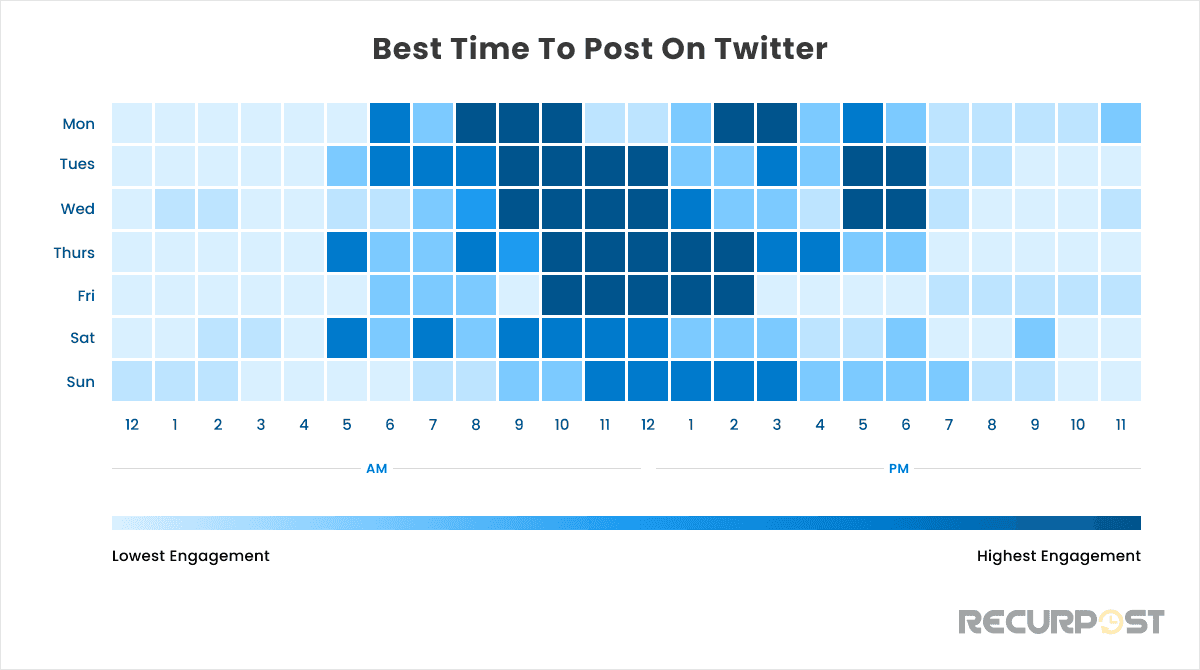
| X (Twitter) | Tuesday and Wednesday | 9 AM to 12 PM, second lift afternoon to 6 PM | Late evenings; weekends outside 9 to 11 AM |
| Tuesday to Thursday | 10 AM to 2 PM, peak 10 to 11 AM | Weekends and 10 PM to 5 AM | |
| TikTok | Monday, Friday, Saturday | Monday 1 PM; Friday 8 PM; Saturday 8 PM | Early mornings |
| YouTube | Wednesday and Thursday | 12 to 3 PM | Overnight |
| Weekends first, then midweek | 8 PM to 10 PM, plus a 10 AM to 1 PM lift | Early mornings before 8 AM | |
| Google Business Profile | Varies by location | No universal window; test by location | No universal worst hour; a stale posts section is the bigger risk |
| Threads | Tuesday to Thursday, Wednesday strongest | 8 AM to 11 AM, peak 9 AM Thursday | Saturdays and 6 to 11 PM |
| Bluesky | Tuesday to Thursday | 9 AM to 1 PM | Late evenings |
Each row summarizes the complete timing guide for the respective tool, with links to the detailed sections below. These recommendations are most useful if your account does not yet have enough engagement history. However, if your account has around 2 months of performance data, you should rely on your own engagement patterns instead of general averages. Importantly, the last two sections of this guide explain when and how to transition from general recommendations to account-specific posting times.
Where These Posting Windows Come From
RecurPost builds these posting windows using engagement data from posts scheduled through the RecurPost social media scheduler itself. The Facebook recommendations are based on more than 2 million scheduled Facebook posts. Similarly, the TikTok recommendations come from more than 2 million TikTok posts, while the YouTube recommendations are based on a study of more than 2 million videos.
As a result, this first-party scheduling data provides a more reliable benchmark. This is primarily because it measures when scheduled business posts received engagement rather than when individual users were simply active online.
You should treat these posting windows as guidance rather than guarantees. Publishing within a recommended window can help your posts gain early engagement. However, content quality and account history still have the greatest influence on overall performance. Early engagement can also improve your post’s reach across algorithmic feeds.
However, these recommendations apply only to organic scheduled posts, whereas paid campaigns, product launches, and time-sensitive announcements should follow your campaign schedule instead.
This data also helps support client discussions. For example, if you need to justify a posting schedule for the next quarter, you can refer to the dataset behind each recommendation. This approach is more reliable than relying on multiple third-party studies that often reach different conclusions.

Best Time to Post on Facebook
Facebook engagement is highest on weekday mornings between 9 AM and 1 PM, with Tuesday through Thursday delivering the strongest results. In contrast, posts published between 11 PM and 5 AM generally reach the fewest people. Posting performance also varies by content format, as feed posts perform best during the morning hours, whereas Reels typically gain more engagement between 4 PM and 9 PM.
These posting windows work well for business Pages because many users check Facebook during work breaks. If your Page has enough engagement data, RecurPost can also recommend posting times based on your audience’s activity instead of general benchmarks.

For a more detailed breakdown, the guide on the best time to post on Facebook explains the recommended posting windows by day and content format.

Best Time to Post on Instagram
Instagram engagement is highest on weekdays between 10 AM and 3 PM, with Tuesday through Thursday delivering the strongest results. In contrast, late nights and most weekends generally see lower engagement. While evening posting is a common recommendation for Instagram, RecurPost’s latest data shows that weekday midday posting performs better for most business accounts.
These midday posting windows often overlap with client approval workflows that take place during business hours. However, scheduled publishing removes that challenge because approvals can happen at any time while the post is automatically published at the scheduled hour, such as 11 AM.

If you want a more detailed breakdown, the guide on the best times to post on Instagram covers the recommended posting windows for Reels, Stories, and carousel posts separately.

Best Time to Post on X (Twitter)
X engagement peaks on weekday mornings from 9 AM to 12 PM, with a second lift in the afternoon that extends to 5 to 6 PM on Tuesday and Wednesday, the two strongest days of the week. Weekends are lighter, holding a narrower 9 to 11 AM window, and late evenings underperform on every day.
Posting times also vary by audience location. For example, a B2B audience in New York is active at different times than a food brand’s audience in Sydney. For that reason, every recommended posting window is based on your audience’s local time zone rather than your own.

If you need a more detailed breakdown, the guide on the best time to post on X (Twitter) includes day-by-day recommendations and time zone tables.
Best Time to Post on LinkedIn
LinkedIn reach is highest from Tuesday to Thursday between 10 AM and 2 PM, with the strongest engagement usually occurring between 10 AM and 11 AM. In contrast, weekends and the overnight hours from 10 PM to 5 AM generally receive the lowest engagement. Since most B2B audiences are active during the workweek, posting within these midweek windows gives your content a better chance of reaching the right audience.
Among these days, Wednesday consistently delivers the strongest results for most accounts. However, posting times can still vary depending on your audience’s location and activity patterns.

If you need a more detailed breakdown, the guide on the best and worst times to post on LinkedIn includes day-by-day recommendations and time zone guidance for global audiences.

Best Time to Post on TikTok
TikTok’s strongest posting windows are Monday at 1 PM, Friday at 8 PM, and Saturday at 8 PM, based on RecurPost’s analysis of more than 2 million TikTok posts. In addition, weekday mornings between 10 AM and 11 AM also perform well for many accounts. In contrast, early morning posting generally receives lower engagement.
Since these high-performing windows are spread across different days and times, scheduling posts in advance is often more practical than publishing them manually. For example, you do not need to publish a client video manually at 8 PM on a Saturday because RecurPost can automatically publish it at the scheduled time.

If you want a more detailed breakdown, the guide on the best time to post on TikTok includes the recommended posting windows for each day of the week.

Best Time to Post on YouTube
YouTube videos receive the most early views when they are published between 12 PM and 3 PM on weekdays, with Wednesday and Thursday delivering the strongest results. RecurPost’s study of more than 2 million YouTube videos supports these posting windows. However, YouTube Shorts follow different engagement patterns. As a result, their best posting times are not always the same as those for long-form videos.
Notably, the first few hours after publishing play an important role in YouTube’s recommendation system. Therefore, maintaining a consistent upload schedule is often more effective than posting at random times. As a result, a regular publishing routine can help your videos build momentum more consistently.

If you need a detailed breakdown, the complete guide on the best time to post on YouTube covers the recommended posting windows for both videos and Shorts across different days, regions, and niches.

Best Time to Post on Pinterest
Pinterest engagement is generally highest during the afternoon and evening hours, while weekends often perform better than weekdays. Unlike LinkedIn and X, Pinterest users are more likely to browse when they are relaxing after work, which shifts the best posting windows later in the day.
Timing can help a Pin gain early engagement, but it does not determine its long-term performance because Pins can continue appearing in search results and on boards for months. Instead, maintaining a consistent posting schedule throughout the week is usually more effective than publishing many Pins in a one-time slot.

If you want a more detailed breakdown, the complete guide on the best time to post on Pinterest explains the recommended posting windows by day, niche, and country.

Best Time to Post on Google Business Profile
There is no universal best time to post on Google Business Profile, and Google publishes no official posting times. Posts appear when customers search for your business in Google Search and Google Maps, so timing follows local demand rather than a feed algorithm. The reliable method is a four-week test for each location, comparing like-for-like weeks in its Performance data.
This matters most for businesses with multiple locations. For example, a healthcare provider with 14 locations should run the test at each location on its own local clock, rather than using a single posting time across every branch.
If you need more detailed recommendations, the complete guide to the best time to post on Google Business Profile explains how to run a four-week timing test for each location, with the demand windows by business type and the lifespan of each post type.
Best Time to Post on Threads
Threads engagement peaks on weekday mornings between 8 AM and 11 AM, with Wednesday the strongest day and 9 AM on Thursday the single best slot. Saturdays and evenings from 6 PM to 11 PM are the weakest windows. Threads runs on the same Meta accounts as Instagram and the two audiences often overlap, but the Threads window sits earlier in the day than Instagram’s, so schedule it against its own window rather than copying your Instagram times. You should then adjust your posting schedule based on your account’s own performance data as it becomes available.
RecurPost lets you publish to Threads from the same composer as the other supported platforms through the Threads scheduler. As a result, adding Threads to your publishing schedule does not require extra workflow.

If you want a more detailed breakdown, the complete guide on the best time to post on Meta Threads covers the recommended posting windows by day, audience type, and posting frequency.
Best Time to Post on Bluesky
Bluesky engagement is highest on weekdays between 9 AM and 1 PM, with Tuesday through Thursday delivering the strongest results. Unlike most platforms, Bluesky’s default feed follows reverse chronological order, so your posts are shown to people who are online the moment they are published. As a result, a post published at 11 PM is likely to be pushed down the feed by the following morning.
Bluesky’s prioritizing the chronological feed makes posting time have a greater impact on visibility than it does on most algorithm-driven platforms covered in this guide.

If you need a more detailed breakdown, the complete guide on the best time to post on Bluesky includes time zone conversions and recommended posting windows for different audience types.
How to Hit These Windows Across Client Accounts and Time Zones
Every window on this page is based on the audience’s local time, which means a multi-client schedule runs across multiple time zones at the same time. For example, a freelancer in Mumbai managing a restaurant in Chicago, a consultancy in London, and a salon in Sydney must schedule posts across three different 9 AM time slots. This indicates that as your client list grows, publishing every post manually becomes difficult.
RecurPost simplifies this process by turning these posting windows into recurring scheduling slots. You only need to save each account’s peak posting times once. Consequently, every post you add to the queue is automatically placed in the next available time slot. At the same time, Workspaces keep each client’s accounts, content, and publishing schedule separate. Therefore, one client’s posting schedule never overlaps with another’s.
If you manage large content libraries, bulk scheduling also lets you upload hundreds of posts through a CSV file, while the queue automatically distributes them across each account’s posting windows.
This workflow becomes more valuable as you add more clients. However, if you manage a single-location business with one local audience, you can simply schedule posts in that location’s time zone without using a more advanced scheduling setup.

When Your Own Data Should Override These Windows
Every posting window in this guide is based on average engagement across hundreds of thousands of social media profiles. However, your client’s account has its own audience and engagement patterns. Once an account has around two months of engagement history, its own analytics become a reliable source of insight. They usually provide more accurate posting recommendations than general benchmark data.
Notably, RecurPost reports show which posts performed and when they are published across all your client accounts in one place. In addition, you can ask the AI to report in plain language which posting times worked best for a specific account and get the answer without exporting anything.
If you want to explore these features further, the reports and analytics page explains what each report includes.
General posting averages are most likely to differ from account performance in a few situations. Some audiences often follow different activity patterns. This includes niche B2B audiences, global audiences spread across multiple continents, and smaller accounts with limited engagement history. For example, a manufacturing company may receive the highest LinkedIn engagement during a 6 AM shift change. This indicates that posting later in the morning may not deliver the best results. In these situations, your account’s own analytics should guide your posting schedule.
However, one exception applies regardless of your engagement data. If you are publishing a time-sensitive post, such as a product launch, an event reminder, or an important announcement, you should publish it when the campaign requires. Notably, recommended engagement windows should not take priority over timely communication.

How Often to Post on Each Platform
Posting frequency influences engagement just as much as posting time. Fast-moving feeds, such as X, TikTok, and Instagram Stories, can generally support 1 to 3 posts per day without causing audience fatigue. In contrast, slower-moving feeds such as Facebook, LinkedIn, and YouTube often perform better with 3 to 5 posts each week instead of daily publishing.
For example, RecurPost recommends posting to Facebook Pages 3 to 5 times per week as a reliable starting point. Regardless of the social media platform you use, maintaining a consistent posting schedule is more effective than posting heavily for a short period and then becoming inactive.

Try RecurPost
RecurPost lets you schedule posts across all 10 social media platforms covered in this guide. Its Agency plan supports up to 20 social accounts for $79 per month without per-user seat charges. Once you save each client’s preferred posting windows as recurring time slots, RecurPost automatically fills the queue based on each account’s own time zone.
You can start a free 14-day trial without a credit card or explore the RecurPost pricing page to compare all available plans and add-ons.
Best Time to Post on Social Media: FAQs
1. Is there one best time to post on every social media platform?
No, there is no single best time to post across every social media platform. However, the recommended posting windows for Facebook (9 AM to 1 PM), Instagram (10 AM to 3 PM), X (9 AM to 11 AM), LinkedIn (10 AM to 2 PM), and Bluesky (9 AM to 1 PM) all overlap during weekday mornings, especially between 10 AM and 1 PM. In contrast, TikTok and Pinterest usually perform better during evenings and weekends.u003cbru003eIf you need one posting window across multiple platforms, weekday late mornings are the most practical choice, while TikTok and Pinterest are better scheduled separately.
2. Should I schedule posts in my time zone or my audience’s time zone?
You should schedule posts based on your audience’s local time zone, rather than the time zone where you are located. For example, if the best posting window is 10 AM, it should be 10 AM where your audience is located rather than where you are working. If you are a freelancer in the UK managing a client’s social media accounts in the US, you should schedule posts for US morning hours, even though that falls in the UK afternoon. RecurPost makes this easier by allowing each account to follow its own posting schedule, so every client’s queue runs according to its local time zone.
3. Do the best posting times matter on weekends?
Yes, weekend posting can be effective, but it depends on the platforms. Pinterest and TikTok often see higher engagement on Saturdays and Sundays because users are more active during the weekend. In contrast, LinkedIn generally performs better on weekdays than on weekends. Google Business Profile has no universal window and is best tested by location. For most business Pages, Facebook’s weekday morning posting window remains the more reliable choice.
4. How long should I test a posting window before changing it?
You should test each posting window for at least two weeks before making changes. This gives most accounts enough published posts to compare the performance of similar content across different posting windows. After your account has around two months of engagement history, you should rely on its own analytics to set your posting schedule. However, if engagement starts to decline, it is a good idea to test new posting windows again.
5. How often do the best times to post change?
Best posting times change gradually rather than frequently. Audience behavior and platform usage typically shift over months instead of weeks. Therefore, the recommended posting windows are updated over time. Instagram is a good example. For many years, evening posting was widely recommended, whereas RecurPost’s data now shows that weekday afternoons perform better for most business accounts. If your engagement starts to decline during a posting window that previously worked well, you should review the latest platform-specific timing recommendations and adjust your schedule if needed.